LINE Chatbot for Restaurants: Setup Guide & Examples
How restaurants and cafés use a LINE Official Account: a rich menu for menu, booking and directions, keyword replies for hours, parking and delivery, bookings through the tools you already use, and promotions that fit LINE's message quota. Facts as of October 2026.
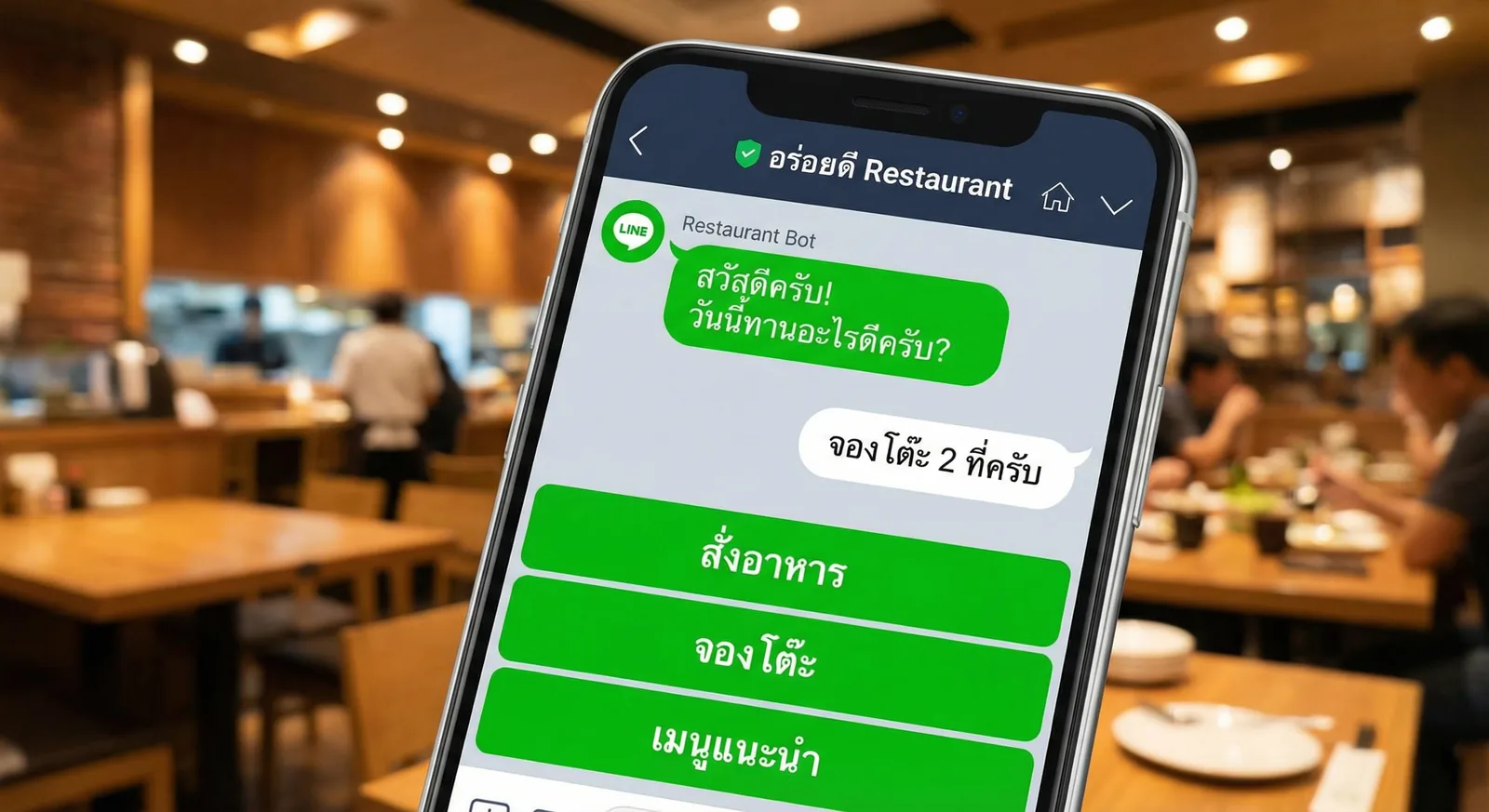
#What a LINE Chatbot Does for a Restaurant
For most restaurants, a LINE chatbot is a rich menu plus automatic replies on your LINE Official Account (LINE OA). Customers tap Menu, Book a table or Directions, or type "open today?", and get an answer straight away, even when the phone is ringing or the kitchen has closed. Bookings, orders and payments usually stay in the tools you already use, linked from LINE, and staff keep their time for the conversations that need a person.
What customers ask a restaurant on LINE, and what should answer it:
| Question | Best answer on LINE | Uses your message quota? |
|---|---|---|
| "Are you open today?" "Where can I park?" | Keyword auto-reply, plus a rich menu button | No |
| "Can I see the menu?" | Rich menu button to your menu page, or a card reply | No |
| "Table for 4 at 7 pm?" | Booking link in the rich menu, or a reply in 1:1 chat | No |
| "Do you deliver?" | Rich menu button to your delivery-app store | No |
| "Any promotion this week?" | A broadcast or a coupon, sent when there is news | Yes, one message per recipient |
| Complaints, large groups, allergies | Staff in 1:1 chat | No |
Two rules decide how well this works:
- Replies are free; broadcasts are not. Greeting messages, auto-replies, 1:1 chat and Reply API messages don't use your monthly quota. Broadcasts and push messages do, counted per recipient (costs below).
- LINE OA Manager matches keywords exactly. A reply set for "hours" won't answer "what are your hours?". Register every variant, or add buttons that send the exact keyword (LINE manual, in Japanese).
#The LINE OA Toolkit for Restaurants
Everything in this table is built into a free LINE Official Account (as of October 2026):
| Tool | What a restaurant uses it for |
|---|---|
| Greeting message | Welcome new friends, list keywords to try, attach a first-visit coupon (up to 5 bubbles) |
| Auto-replies | Opening hours, location, parking, delivery area, Wi-Fi, holiday closures |
| Rich menu | A permanent panel of buttons under the chat: menu, booking, delivery, map, contact |
| Rich messages and card messages | Today's special, a lunch set, several branches in one carousel |
| Broadcasts | New dishes, weekday lunch sets, events, closures |
| Coupons | "Free dessert this week", shown at the counter |
| Reward cards | Digital stamp cards (บัตรสะสมแต้ม in Thailand, ショップカード in Japan, 集點卡 in Taiwan) |
| 1:1 chat | Bookings, group orders, special requests |
| Insight | Friends added and blocks per day, opens and clicks per broadcast |
LINE Thailand also sells two products that suit restaurants:
- MyCustomer | CRM: membership, points and rewards. ฿369 a month on the Free and Basic plans, included in Pro, excluding VAT.
- LINE MINI Eats: customers order and pay ahead inside LINE, then collect without queuing; payments go through LINE MAN Wongnai. It needs a LINE OA, charges a monthly fee instead of a commission on each order and offers single-branch shops a 30-day free trial. Check the page for the current price.
New to LINE OA? Start with how to create a LINE Official Account.
#Rich Menu Layouts for Restaurants and Cafés
The rich menu is the panel of buttons under the chat. For a restaurant it does most of the work, because a tap can't be misspelt. LINE OA Manager offers a large template (2500 × 1686 px, up to 6 areas) and a compact one (2500 × 843 px, up to 3 areas), and each area can open a link, send a text, open a coupon or open a reward card (LINE Thailand manual).
Six buttons for a full-service restaurant:
| 📖 Menu (link to your menu page) | 📅 Book a table (link to your booking page) | 🛵 Delivery (link to your delivery-app store) |
| 🎁 This month's offer (coupon) | 📍 Map & hours (sends "hours") | 💬 Contact us (sends "contact") |
Three buttons for a café or kiosk (compact): Menu · Promotions · Map & hours.
Tips:
- Keep prices out of the image. Prices change; a link or a card reply is easier to update than a new rich menu.
- Pair text buttons with keyword replies. A "Map & hours" button that sends "hours" always triggers your "hours" auto-reply.
- Swap menus for festivals. Give a Songkran or New Year menu its own display period. OA Manager shows one rich menu at a time, and periods can't overlap.
- Want five buttons? OA Manager has no 5-area template. Use 4 or 6, or a custom layout through the Messaging API.
Every screen of the setup is in how to create a LINE rich menu. If you'd rather describe the menu than design it, use an AI rich menu maker.
#Keyword Replies for Hours, Parking and Delivery
Set these up first: they answer the questions that arrive when nobody can pick up the phone. In LINE OA Manager, create one auto-reply per topic and register every word customers actually type.
| Topic | Keywords to register | What the reply should contain |
|---|---|---|
| Opening hours | hours, open, open today, closing time | Days, hours, last order, closures |
| Location | map, location, address, where | Address, landmark, map link |
| Parking | parking, park, car | Where to park, free or paid, a backup car park |
| Menu | menu, food, price | Link to the menu, or a card with today's set |
| Booking | book, reserve, table | How to book and the booking link |
| Delivery | delivery, takeaway, pickup | Delivery-app links, delivery area, pickup time |
Replies you can adapt (replace the parts in square brackets):
🕙 We're open Tue–Sun, 11:00–22:00 (last order 21:30). Closed on Mondays. 📍 Map: [your map link] Want a table tonight? Type "book".
🚗 Free parking in the building basement (B1–B2); show your receipt at the exit. Full? There's a paid car park [100 m] away on [street].
🛵 Delivery: order on [app 1] or [app 2]: [links] Pickup: type your order in this chat and collect it in about [20] minutes.
🎉 We're closed [13–15 April] for Songkran and back on [16 April] at 11:00. Happy Songkran!
Set the holiday notice as a reply-to-all auto-reply scheduled for those dates. Without a keyword match, a reply scheduled for a date range is sent before your usual after-hours reply, and keyword replies always win. If chat is switched on, check that the response method in Settings > Response settings includes auto-replies, or they won't be sent.
Fifty more templates, by industry: LINE OA auto-reply examples.
#Table Bookings on LINE: Four Realistic Options
A LINE OA doesn't manage a table plan or check availability on its own, so bookings come in one of four ways:
| Option | How it works | Good for | Watch out for |
|---|---|---|---|
| 1. Booking link in the rich menu | The button opens the booking page you already use | Restaurants with an online booking system | Customers leave the chat for a web page |
| 2. Bookings in 1:1 chat | Customers send name, date, time and party size; staff confirm | Small restaurants, cafés | Someone has to reply during opening hours |
| 3. "LINEで予約" (Japan) | Customers book from your LINE OA profile through a partner system such as TableCheck, Toreta or Gurunavi | Restaurants in Japan already using a partner | Japan only; partner contract required |
| 4. Custom booking inside LINE | A LIFF or LINE MINI App connected to your table plan, with confirmations sent by the Messaging API | Chains, busy venues, deposits | Custom development and upkeep |
LY Corporation lists booking fees through a LINE OA as ¥0 for "LINEで予約", though partner plans may differ (LINE for Business Japan, October 2026).
Option 2 runs smoothly with a fixed format. Put it in your "book" keyword reply:
📅 Book a table
Please reply with:
1) Name
2) Date and time
3) Number of guests
4) Phone number
We confirm within [30 minutes] during opening hours ([11:00–22:00]).
Groups of [8] or more: please call [phone].
About reminders: a reminder the day before is a push message to one customer. LINE OA Manager can't send one per booking automatically, so it has to come from your booking system or a Messaging API integration, and each one counts against your quota. Small restaurants can simply type the reminder in the chat where the customer booked; chat messages don't use the quota.
Want bookings, deposits and reminders handled inside LINE? That is custom LINE app development: tell us what you need.
#Menus, Ordering and Delivery
Showing the menu:
- A link to your menu page (website, PDF or online menu) is the easiest to keep up to date.
- Card messages in LINE OA Manager show up to 9 dishes or sets in a swipeable carousel, each with a photo, a price and a button. Good for a lunch-set broadcast.
- A rich message card (image, headline, button) works as the reply to "menu" or "promo".
For the menu itself, use photos of your own dishes: customers want to see what will arrive at the table.
Taking orders:
| Way | How it works | Cost and effort |
|---|---|---|
| Delivery apps | Rich menu button to your store on LINE MAN, GrabFood or another app | The app's commission; nothing to set up in LINE |
| Orders in 1:1 chat | Customers type their order; staff confirm and send payment details, such as a PromptPay QR | Free; works for small volumes |
| LINE MINI Eats (Thailand) | Order and pay ahead inside LINE; customers get a LINE notification when the order is ready | Monthly fee, no commission per order (October 2026) |
| Custom ordering | Your own ordering screens inside LINE (LIFF or LINE MINI App), connected to your POS | Custom development |
Outside Thailand, ask your POS or ordering provider whether it offers a LINE MINI App version of its mobile ordering.
#Promotions, Coupons and What Broadcasts Cost
Broadcasts are the only part that can cost more than your plan, so send them when there is news: a new dish, a weekday lunch set, a rainy-day delivery deal, an event, a closure. LINE Thailand suggests 2–4 broadcasts a month for a shop that is just starting, sent when customers are likely to look, such as before lunch or after work.
How LINE counts: recipients × sends. One broadcast to 1,200 friends uses 1,200 messages, and friends who blocked you aren't counted. Thai plans as of October 2026, excluding 7% VAT (LINE for Business):
| Friends | Broadcasts a month | Messages | Plan that fits | Monthly cost |
|---|---|---|---|---|
| 280 | 1 | 280 | Free (300 messages) | ฿0 |
| 800 | 4 | 3,200 | Basic (15,000) | ฿1,280 |
| 3,000 | 4 | 12,000 | Basic (15,000) | ฿1,280 |
| 3,000 | 8 | 24,000 | Pro (35,000) | ฿1,780 (Basic plus extras would be ฿2,180) |
In Japan the free plan includes 200 messages, Light (¥5,000) 5,000 and Standard (¥15,000) 30,000, excluding tax. In Taiwan, from 1 November 2026, light usage is free with 200 messages, medium usage (NT$1,000) includes 3,000 and high usage (NT$1,400) 6,000. All the details are in our LINE Official Account pricing guide.
Ways to spend less quota:
- Target instead of sending to everyone, for example to one region or to people who tapped your last offer. Targeted broadcasts need a target reach of at least 100 friends, and an audience (such as people who clicked a past message) needs at least 50 people (LINE Thailand help center).
- Keep evergreen information in the rich menu, not in repeated broadcasts.
- Ask for a reply. "Type BOOK to reserve" starts a conversation that costs nothing.
- Check blocks the day after every broadcast in Insight, and send less of whatever causes a jump.
Three broadcasts to adapt:
🍜 New this week: Tom Yum Ramen, ฿[159]
Lunch set with Thai iced tea, Mon–Fri until 14:00.
[Button: See the menu]
🌧️ Rainy day? Free delivery on orders over ฿[300], today only
Order on [app] before 20:00.
[Button: Order now]
🍰 This week only: free dessert with any set menu
Show this coupon at the counter, [13–19 October].
[Coupon]
Create coupons and reward cards in LINE OA Manager, then attach them to the greeting message (a first-visit coupon), a broadcast or a rich menu button. A reward card collects a stamp per visit and unlocks a reward when it is full. Formats, image sizes and timing: LINE OA broadcast guide.
#A Two-Week Setup Plan
Week 1: answer the questions
- Create or tidy your LINE OA: name, profile photo, cover, address and opening hours (setup guide).
- Write the greeting message: thanks, 3–5 keywords to try, a pointer to the rich menu and, if you like, a first-visit coupon.
- Build a 3- or 6-button rich menu from the layouts above.
- Add keyword replies for hours, location, parking, menu, booking and delivery, plus a holiday notice when you need one.
- Test from a personal LINE account: every button, every keyword and a misspelt keyword.
Week 2: bring people in and send the first offer
- Put your LINE QR code where people wait: tables, menus, the counter, receipts, takeaway bags, your Google Business Profile and social media bios.
- Choose how bookings come in (one of the four options) and decide who answers the chat, and when.
- Send your first broadcast with one clear offer, then plan next month (2–4 sends to start).
- The day after, open Insight: friends added, blocks, opens and clicks.
#How LineBot.pro Helps Restaurants
LineBot.pro makes the visual and automated parts of this guide with AI. It doesn't replace LINE OA Manager, your booking system or your POS.
- AI rich menu. Describe your restaurant and the buttons ("6 buttons: Menu, Book, Delivery, Offer, Map, Contact; warm Thai street-food style") and get the image plus the JSON for 1–6 buttons, each opening a link or sending a text, for 10 credits. You upload the image in LINE OA Manager yourself (choose 4 or 6 buttons there, because it has no 5-button template), and at that point you can still set any button to a coupon or reward card.
- Rich message cards. One Flex card with a 1200 × 675 px image, headline, short text and a button (plus an optional call button) for today's special or an offer. 8 credits each; download the PNG or JPEG and the JSON, or copy the JSON.
- Keyword bot with AI routing. Up to 8 topics per LINE account with 1–15 keywords each, matched anywhere in a sentence, each answered with a card you approved. Keyword replies cost 0 credits. Optional AI routing assigns unmatched messages to a topic only when it is at least 85% confident (1 credit per message checked, with a daily cap you set), and the AI never writes answers itself. Phrases such as "human" or "live agent" (editable) pause the bot for that customer so staff can take over. A free simulator lets you test first; it answers 1:1 chats only.
- Campaigns. The AI makes an offer card, then you send it to all friends or to a pasted list of LINE user IDs, now or on a schedule. Sending costs 0 credits; LINE's quota still applies, and the page shows delivery status, follower count and your monthly quota.
What it doesn't do: take bookings or orders, connect to a POS or delivery app, run stamp cards or points, or track opens and clicks. Images are generated from your description, so you can't upload your own dish photos. Bookings or ordering inside LINE are available as custom development.
New accounts get 50 free credits with no card, enough for 5 rich menus. After that, buy one-time credit packs: no subscription, and credits don't expire. Everything for restaurants is on our LINE OA for restaurants page, or go straight to create your restaurant's rich menu.
#Frequently Asked Questions
Q: Can a LINE Official Account take table bookings automatically?
Not on its own: it can't check availability. Link your booking page from the rich menu, take bookings by hand in 1:1 chat, use "LINEで予約" through a partner system in Japan, or have a booking flow built as a LIFF or LINE MINI App. Auto-replies can explain how to book.
Q: Do LINE auto-replies cost money?
No. Greeting messages, keyword auto-replies, 1:1 chat and Reply API messages don't count towards your monthly quota in Thailand, Japan or Taiwan. Only broadcasts and push messages do, one message per recipient.
Q: Which LINE OA plan does a restaurant need?
Multiply friends by broadcasts per month. In Thailand (October 2026, excluding VAT), up to 300 messages a month is free, Basic (฿1,280) covers 15,000 and Pro (฿1,780) 35,000. A restaurant with 800 friends that broadcasts weekly needs about 3,200 messages, so Basic.
Q: Can customers order food through LINE?
Yes: through a rich menu button to your delivery-app store, by typing the order in 1:1 chat, with LINE MINI Eats for order-ahead pickup in Thailand, or with a custom ordering app inside LINE. LineBot.pro doesn't take orders.
Q: Can I run a stamp card or points on LINE?
Yes. Reward cards are built into LINE OA Manager in Thailand, Japan and Taiwan. In Thailand, MyCustomer | CRM adds membership, points and rewards for ฿369 a month plus VAT on the Free and Basic plans (included in Pro). Add a rich menu button that opens the card.
Next steps:
- Write your replies with these LINE OA auto-reply examples
- Plan the buttons with how to create a LINE rich menu
- Plan promotions with the LINE OA broadcast guide
- Answer full-sentence questions with a LINE chatbot that uses keywords and AI routing
- See everything LineBot.pro does for restaurants
Related Services
About LineBot.pro
LineBot.pro is an AI tool for LINE Official Accounts: it creates Rich Menus, Rich Messages and banners, sends broadcast campaigns and runs keyword auto-replies. Our team writes these guides based on hands-on work with the LINE Messaging API.
Contact usRelated Articles
LINE Auto-Reply & Greeting Message Examples (50 Templates)
Copy-paste templates for every automatic message a LINE Official Account sends: greeting (welcome) messages by industry, keyword replies, after-hours and holiday notices, staff handoff, chat scripts for admins and follow-ups, checked against LINE's rules as of October 2026.
Read More
LINE Rich Menu: Sizes, Templates & Setup Guide
Create a LINE Rich Menu with the right image size, useful buttons and a clear layout. Includes templates, setup steps and an AI-assisted design workflow.
Read More
LINE OA Broadcast: How to Send, Quotas & Tips (2026)
How to send a broadcast from LINE Official Account Manager on the web and in the app, which message types and filters you can use, how LINE counts messages against your monthly quota, image sizes, timing tips and ready-to-adapt examples.
Read MoreReady to Automate Your LINE Business?
Start automating your LINE communications with LineBot.pro today.