LINE API Integration Tutorial: Messaging API, Login, LIFF
A developer's map of the LINE APIs in 2026 and how to call them directly: what each API can do, channel setup, reply and push with fetch, webhook signature verification, LINE Login with PKCE, LIFF ID tokens, rate limits and error handling.
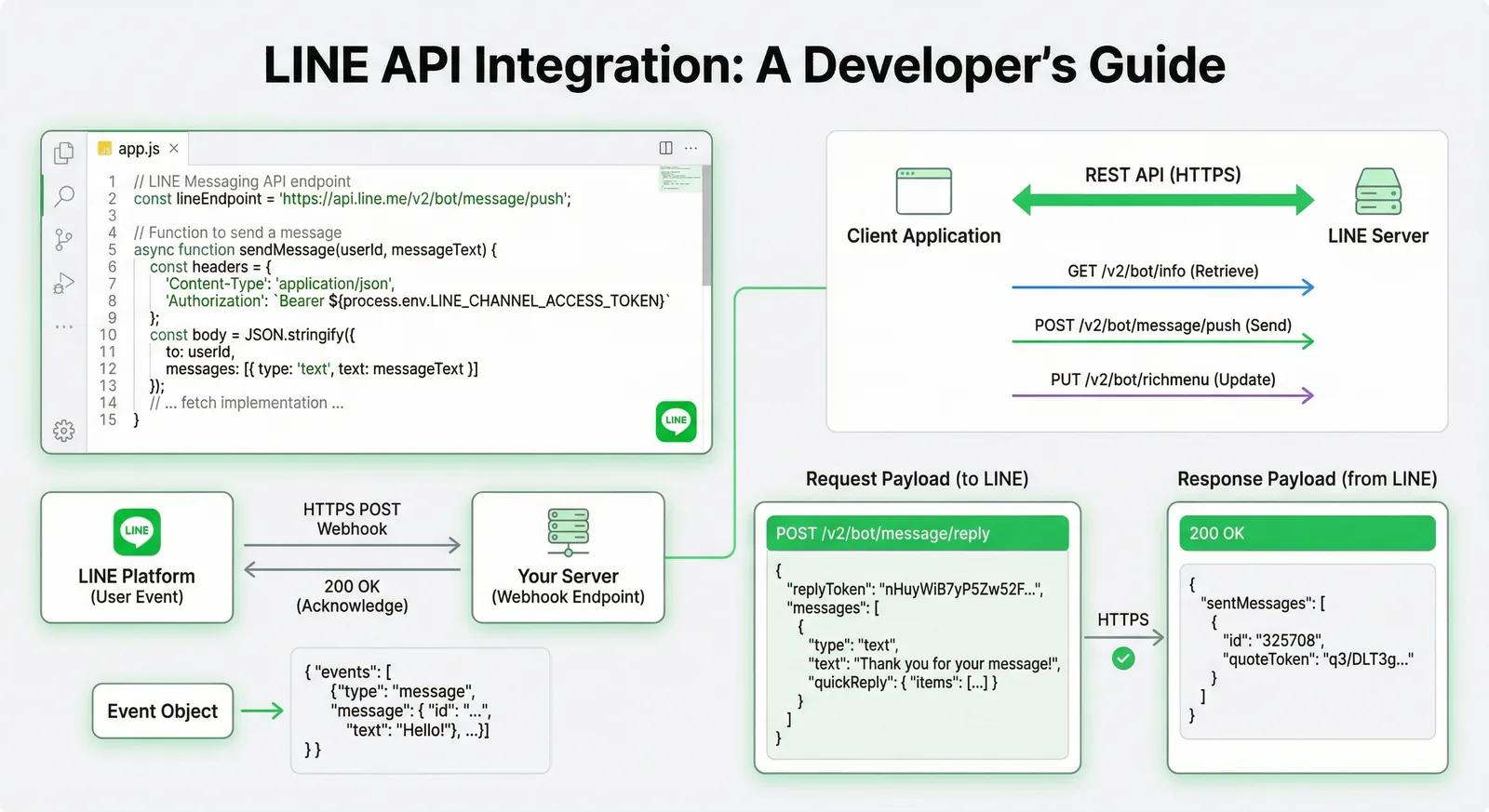
#What You Can Do With the LINE APIs (2026)
LINE gives developers four public building blocks: the Messaging API to send and receive messages as a LINE Official Account, LINE Login to let people sign in to your website or app with their LINE account, LIFF (LINE Front-end Framework) to run your web app inside LINE, and the LINE MINI App platform, which lists LIFF-based apps as services inside LINE. This tutorial calls them directly over HTTPS from Node.js 22 with fetch (no SDK), with a Python version of the webhook. Facts are checked against developers.line.biz as of October 2026.
| API | What you can do with it | Typical use |
|---|---|---|
| Messaging API | Reply to messages; send push, multicast, broadcast and narrowcast messages; rich menus, quick replies, Flex Messages; user profiles, audiences, statistics, coupons | Chatbots, order and booking notifications, customer support |
| LINE Login | OAuth 2.0 / OpenID Connect sign-in; user ID, display name and picture; email once LINE approves the permission; option to add your LINE Official Account as a friend | "Log in with LINE" on your site or app, account linking |
| LIFF | Web apps that open inside LINE and know the user (ID token, profile), send messages to the current chat, open the share target picker, scan QR codes | Forms, membership cards, booking pages inside LINE |
| LINE MINI App | LIFF apps that LINE lists as services; since March 11, 2026 anyone can publish unverified MINI Apps in Taiwan and Thailand | Store apps, reservations and membership without a native app |
| LINE Social Plugins | Share and add-friend buttons for websites | Sharing articles, gaining friends from your site |
A few APIs are reserved for approved corporate customers (for example LINE notification messages). Two services you still see in older tutorials are gone: LINE Notify ended on March 31, 2025 (send Messaging API push messages from a LINE Official Account instead, see our LINE Notify alternative guide), and LINE removed its LINE Pay documentation in April 2025 after LINE Pay ended in Japan.
Which one do you need?
- A bot that answers customers or sends notifications → Messaging API
- Sign-in on your own website or app → LINE Login
- A web page that runs inside LINE and knows who the user is → LIFF (LINE now recommends creating new LIFF apps as LINE MINI Apps)
- Chat plus a web front end → Messaging API and LIFF under the same provider
Prefer the official SDK? The @line/bot-sdk Express middleware tutorial and the LINE chatbot development tutorial build the same webhook with @line/bot-sdk v11.
#Developer Setup: Providers, Channels and Credentials
1. Developer account and provider. Log in to the LINE Developers Console and create a provider, the company or person that offers the service. Choose it carefully: you can't move a channel to another provider later, and the same LINE user gets a different user ID under each provider. A Messaging API channel and a LINE Login channel that must share user IDs belong under the same provider.
2. Messaging API channel. Since September 4, 2024 you can't create a Messaging API channel in the console. Create a LINE Official Account first, then in LINE Official Account Manager open Settings → Messaging API, enable it and select your provider. The channel then appears in the console.
3. LINE Login channel. Create it in the console under the same provider, choose the app type (Web app or Mobile app) and register your callback URL in the LINE Login tab.
4. LIFF app. LIFF apps are added to a LINE Login channel or a LINE MINI App channel (up to 30 per channel), never to the Messaging API channel. You get a LIFF ID and a LIFF URL (https://liff.line.me/{liffId}).
Provider "My Shop"
├── Messaging API channel   (linked to the LINE Official Account)
├── LINE Login channel      (web login + LIFF apps)
└── LINE MINI App channel   (optional)
| Credential | Where to find it | Used for |
|---|---|---|
| Channel ID | Basic settings tab | LINE Login client_id, ID token verification, issuing tokens |
| Channel secret | Basic settings tab | Webhook signature verification, LINE Login token exchange |
| Channel access token | Messaging API tab (long-lived) or issued through the API | Authorization: Bearer header of Messaging API calls |
| LIFF ID | LIFF tab of the LINE Login or MINI App channel | liff.init({ liffId }) |
There are four kinds of channel access token: tokens with a user-specified expiration (v2.1, up to 30 days, the type LINE recommends), stateless tokens (15 minutes), short-lived tokens (30 days) and one long-lived token per channel (no expiry, Messaging API only). Keep every secret on the server, in environment variables or a secret manager:
# .env
LINE_CHANNEL_ACCESS_TOKEN=...
LINE_CHANNEL_SECRET=...
LINE_LOGIN_CHANNEL_ID=...
LINE_LOGIN_CHANNEL_SECRET=...
#Messaging API: Reply, Push and Multicast With fetch
Every Messaging API call is an HTTPS request to https://api.line.me with your channel access token in the Authorization header. A small helper covers most bots:
// line-api.ts: minimal Messaging API client with fetch (Node.js 22+)
const API = "https://api.line.me/v2/bot"
const token = process.env.LINE_CHANNEL_ACCESS_TOKEN
if (!token) throw new Error("Set LINE_CHANNEL_ACCESS_TOKEN")

export type LineMessage = { type: string; [key: string]: unknown }

export class LineApiError extends Error {
  constructor(public status: number, public requestId: string | null, public body: string) {
    super(`LINE API ${status}: ${body}`)
  }
}

async function post(path: string, body: unknown, headers: Record<string, string> = {}) {
  const res = await fetch(`${API}${path}`, {
    method: "POST",
    headers: { "Content-Type": "application/json", Authorization: `Bearer ${token}`, ...headers },
    body: JSON.stringify(body),
  })
  if (!res.ok) throw new LineApiError(res.status, res.headers.get("x-line-request-id"), await res.text())
  return res.json() as Promise<{ sentMessages?: { id: string; quoteToken?: string }[] }>
}

// Reply: needs the replyToken from a webhook event, max 5 messages, not counted in your quota
export function reply(replyToken: string, messages: LineMessage[]) {
  return post("/message/reply", { replyToken, messages })
}

// Push: one user, group or room; reuse the same retryKey (UUID) when you retry the same push
export function push(to: string, messages: LineMessage[], retryKey: string) {
  return post("/message/push", { to, messages }, { "X-Line-Retry-Key": retryKey })
}

// Multicast: up to 500 user IDs per request
export function multicast(to: string[], messages: LineMessage[]) {
  if (to.length > 500) throw new Error("multicast accepts at most 500 user IDs")
  return post("/message/multicast", { to, messages })
}
Reply or push? A reply uses the replyToken of a webhook event. Each token works once, and LINE asks you to use it within about one minute of receiving the webhook (later use isn't guaranteed). Replies don't count toward your monthly message quota. Push, multicast, broadcast and narrowcast messages do: LINE counts one message per recipient, whatever the number of message objects in the request (5 at most). Users who blocked you aren't counted.
| Method | Endpoint | Recipients | Counts toward the quota |
|---|---|---|---|
| Reply | POST /v2/bot/message/reply | The user, group or chat of the event | No |
| Push | POST /v2/bot/message/push | 1 user, group or multi-person chat | Yes |
| Multicast | POST /v2/bot/message/multicast | Up to 500 user IDs | Yes |
| Broadcast | POST /v2/bot/message/broadcast | All friends | Yes |
| Narrowcast | POST /v2/bot/message/narrowcast | An audience or demographic filter | Yes |
Push reaches friends, groups and multi-person chats your account is in, and users who messaged your account in the last 7 days even without being friends. When a push fails with a network error or a 5xx, retry it with the same X-Line-Retry-Key: if the first attempt was already accepted, LINE answers 409 instead of sending the message twice.
import { randomUUID } from "node:crypto"
import { push, type LineMessage } from "./line-api.js"

const userId = "U0123456789abcdef0123456789abcdef"
const welcome: LineMessage[] = [
  {
    type: "text",
    text: "Your order #1042 has shipped.",
    quickReply: {
      items: [
        { type: "action", action: { type: "uri", label: "Track parcel", uri: "https://example.com/track/1042" } },
        { type: "action", action: { type: "message", label: "Talk to us", text: "I have a question about #1042" } },
      ],
    },
  },
]
const retryKey = randomUUID()
const result = await push(userId, welcome, retryKey)
console.log(result.sentMessages?.map((m) => m.id))
Messages are JSON objects. The three you will use most:
{ "type": "text", "text": "Hello! How can we help?" }
{
  "type": "image",
  "originalContentUrl": "https://example.com/photo.jpg",
  "previewImageUrl": "https://example.com/photo-preview.jpg"
}
{
  "type": "flex",
  "altText": "Weekend promotion: 20% off",
  "contents": {
    "type": "bubble",
    "hero": {
      "type": "image",
      "url": "https://example.com/promo.jpg",
      "size": "full",
      "aspectRatio": "20:13",
      "aspectMode": "cover"
    },
    "body": {
      "type": "box",
      "layout": "vertical",
      "contents": [
        { "type": "text", "text": "Weekend promotion", "weight": "bold", "size": "xl" },
        { "type": "text", "text": "20% off all drinks until Sunday", "wrap": true }
      ]
    },
    "footer": {
      "type": "box",
      "layout": "vertical",
      "contents": [
        {
          "type": "button",
          "style": "primary",
          "action": { "type": "uri", "label": "See the menu", "uri": "https://example.com/menu" }
        }
      ]
    }
  }
}
A text message holds up to 5,000 characters, a quick reply up to 13 buttons, and every image or link must use HTTPS. The number of free messages per month depends on your LINE Official Account plan and country; our LINE Official Account pricing guide lists them. You can check usage with GET /v2/bot/message/quota and GET /v2/bot/message/quota/consumption.
#LINE Login: Authorization Code Flow With PKCE
LINE Login implements OAuth 2.0 and OpenID Connect. The flow:
- Your server redirects the user to
https://access.line.me/oauth2/v2.1/authorizewithstate(against cross-site request forgery),nonce(against replay) and a PKCEcode_challenge. - The user logs in and approves on LINE's consent screen.
- LINE redirects to your callback URL with
codeandstate, or witherror=ACCESS_DENIEDif the user declined. - Your server exchanges the code at
POST https://api.line.me/oauth2/v2.1/token, adding thecode_verifier. - Your server has LINE verify the ID token at
POST https://api.line.me/oauth2/v2.1/verify. Thesubclaim is the user ID.
// login.ts: "Log in with LINE" (authorization code flow + PKCE) with Express 5
import express from "express"
import { createHash, randomBytes } from "node:crypto"

const CHANNEL_ID = process.env.LINE_LOGIN_CHANNEL_ID!
const CHANNEL_SECRET = process.env.LINE_LOGIN_CHANNEL_SECRET!
const REDIRECT_URI = "https://example.com/auth/line/callback" // must match the callback URL in the console

const app = express()
// Demo store; use your session store or database in production
const pending = new Map<string, { nonce: string; codeVerifier: string }>()

function readCookie(header: string | undefined, name: string) {
  return header?.split(/;\s*/).find((c) => c.startsWith(`${name}=`))?.slice(name.length + 1)
}

app.get("/auth/line", (_req, res) => {
  const state = randomBytes(16).toString("hex")
  const nonce = randomBytes(16).toString("hex")
  const codeVerifier = randomBytes(32).toString("base64url") // 43 characters
  const codeChallenge = createHash("sha256").update(codeVerifier).digest("base64url")
  pending.set(state, { nonce, codeVerifier })
  res.cookie("line_state", state, { httpOnly: true, secure: true, sameSite: "lax", maxAge: 10 * 60 * 1000 })

  const params = new URLSearchParams({
    response_type: "code",
    client_id: CHANNEL_ID,
    redirect_uri: REDIRECT_URI,
    state,
    scope: "profile openid",
    nonce,
    code_challenge: codeChallenge,
    code_challenge_method: "S256",
  })
  // URLSearchParams encodes spaces as "+"; LINE's examples use %20
  res.redirect(`https://access.line.me/oauth2/v2.1/authorize?${params.toString().replaceAll("+", "%20")}`)
})

app.get("/auth/line/callback", async (req, res) => {
  const { code, state, error } = req.query
  const saved = typeof state === "string" ? pending.get(state) : undefined
  if (typeof state === "string") pending.delete(state)
  if (error || typeof code !== "string" || !saved || state !== readCookie(req.headers.cookie, "line_state")) {
    res.status(400).send("Login cancelled or invalid state") // error=ACCESS_DENIED when the user declines
    return
  }

  // 1. Exchange the code for tokens
  const tokenRes = await fetch("https://api.line.me/oauth2/v2.1/token", {
    method: "POST",
    headers: { "Content-Type": "application/x-www-form-urlencoded" },
    body: new URLSearchParams({
      grant_type: "authorization_code",
      code,
      redirect_uri: REDIRECT_URI,
      client_id: CHANNEL_ID,
      client_secret: CHANNEL_SECRET,
      code_verifier: saved.codeVerifier,
    }),
  })
  if (!tokenRes.ok) {
    res.status(502).send("Token exchange failed")
    return
  }
  const { access_token, id_token } = (await tokenRes.json()) as { access_token: string; id_token: string }

  // 2. Let LINE verify the ID token (signature, channel ID, expiry, nonce)
  const verifyRes = await fetch("https://api.line.me/oauth2/v2.1/verify", {
    method: "POST",
    headers: { "Content-Type": "application/x-www-form-urlencoded" },
    body: new URLSearchParams({ id_token, client_id: CHANNEL_ID, nonce: saved.nonce }),
  })
  if (!verifyRes.ok) {
    res.status(401).send("Invalid ID token")
    return
  }
  const claims = (await verifyRes.json()) as { sub: string; name?: string; picture?: string }

  // 3. Optional: current profile with the access token
  const profile = await fetch("https://api.line.me/v2/profile", {
    headers: { Authorization: `Bearer ${access_token}` },
  }).then((r) => r.json() as Promise<{ userId: string; displayName: string; pictureUrl?: string }>)

  // claims.sub is the user's LINE user ID for your provider: create your session here
  console.log(claims.sub, profile.displayName)
  res.redirect("/")
})

app.listen(3000)
Good to know:
statemust be a random alphanumeric value for each login attempt, tied to the browser (here with an HttpOnly cookie). Reject the callback when it doesn't match.- The
emailscope only works after LINE approves the email permission for your channel. - Add
bot_prompt=normalorbot_prompt=aggressiveto the authorization URL to offer your LINE Official Account as a friend during login. The callback then includesfriendship_status_changed.
#LIFF: Pass an ID Token to Your Server
A LIFF app is a regular web app on an HTTPS endpoint that LINE opens in its LIFF browser. Install @line/liff from npm in version 2.31.1 or later (LINE deprecated v2.20.0 to v2.31.0 for a security issue on September 30, 2026), or load https://static.line-scdn.net/liff/edge/2/sdk.js, which always serves the latest 2.x release.
// LIFF app (browser): get an ID token and let your server verify it
import liff from "@line/liff"

await liff.init({ liffId: "1234567890-AbcdEfgh" })
if (!liff.isLoggedIn()) {
  liff.login() // needed in external browsers; in the LIFF browser the user is already logged in
} else {
  const idToken = liff.getIDToken() // requires the openid scope
  await fetch("/api/me", { method: "POST", headers: { Authorization: `Bearer ${idToken}` } })
}
Never send the result of liff.getProfile() to your server as proof of identity: a request body is easy to forge. Send the ID token (or the access token) and verify it on the server with the same POST /oauth2/v2.1/verify call as in the LINE Login section, using the channel ID of the LINE Login channel that hosts the LIFF app. Screen sizes, liff.sendMessages(), the share target picker, external browsers and deployment are covered in our LIFF app development guide.
#Webhooks: Signature Verification and Event Handling
When something happens in a chat (a message, a new friend, a tap on a postback button), LINE sends an HTTPS POST to the single webhook URL of your Messaging API channel. Set it in the console's Messaging API tab, click Verify, then enable Use webhook. The URL needs a certificate from a widely trusted certificate authority (self-signed certificates are refused). If your server answers users, turn off the default greeting and auto-reply messages in LINE Official Account Manager so people don't get two answers.
LINE signs every request: the x-line-signature header is the Base64-encoded HMAC-SHA256 of the raw request body, keyed with your channel secret. Verify it on the exact bytes you received, before parsing the JSON. Parsing and re-serializing the body (what JSON.stringify(req.body) does after express.json()) changes the bytes and breaks verification.
// webhook.ts: receive events without the SDK (Express 5)
import express from "express"
import { createHmac, timingSafeEqual } from "node:crypto"
import { reply } from "./line-api.js"

const CHANNEL_SECRET = process.env.LINE_CHANNEL_SECRET!
const app = express()

function isValidSignature(rawBody: Buffer, signature: string | undefined) {
  if (!signature) return false
  const expected = createHmac("sha256", CHANNEL_SECRET).update(rawBody).digest()
  const received = Buffer.from(signature, "base64")
  return received.length === expected.length && timingSafeEqual(received, expected)
}

type LineEvent = {
  type: string
  webhookEventId: string
  deliveryContext: { isRedelivery: boolean }
  replyToken?: string
  source?: { type: string; userId?: string; groupId?: string; roomId?: string }
  message?: { id: string; type: string; text?: string }
  postback?: { data: string }
}

// express.raw keeps the exact bytes LINE signed; don't use express.json() on this route
app.post("/webhook", express.raw({ type: "application/json" }), (req, res) => {
  const rawBody = req.body
  if (!Buffer.isBuffer(rawBody) || !isValidSignature(rawBody, req.get("x-line-signature"))) {
    res.sendStatus(401)
    return
  }
  const { events } = JSON.parse(rawBody.toString("utf8")) as { events: LineEvent[] }
  res.sendStatus(200) // answer fast, also when events is [] (connection check)
  for (const event of events) handleEvent(event).catch((err) => console.error(err))
})

const seen = new Set<string>() // use Redis or your database with a TTL in production

async function handleEvent(event: LineEvent) {
  if (seen.has(event.webhookEventId)) return // redelivered or duplicate event
  seen.add(event.webhookEventId)

  switch (event.type) {
    case "message":
      if (event.replyToken && event.message?.type === "text") {
        await reply(event.replyToken, [{ type: "text", text: `You said: ${event.message.text}` }])
      }
      break
    case "follow":
      if (event.replyToken) await reply(event.replyToken, [{ type: "text", text: "Thanks for adding us!" }])
      break
    case "postback": {
      const data = new URLSearchParams(event.postback?.data) // e.g. "action=book&slot=10:00"
      console.log("postback", data.get("action"), data.get("slot"))
      break
    }
    case "unfollow":
      // no reply token: the user blocked you; stop sending to event.source?.userId
      break
  }
}

app.listen(Number(process.env.PORT ?? 3000))
What this code takes from LINE's documentation:
- Answer
200to every valid request, including the request with"events": []that LINE sends to check the connection. - Process events asynchronously so a slow handler doesn't hold up later webhooks. On serverless platforms that stop running code once the response is sent, put events in a queue before answering.
- LINE doesn't publish the IP addresses it sends from, so the signature is your authentication.
- Webhook redelivery is off by default. If you enable it in the console, LINE resends webhooks that didn't get a 2xx answer and may deliver an event twice. Skip events whose
webhookEventIdyou have already processed;deliveryContext.isRedeliverytells you an event is a resend.
| Event | Sent when | Reply token |
|---|---|---|
message | A user sends text, an image, video, audio, a file, a location or a sticker | Yes |
follow | A user adds the account as a friend or unblocks it | Yes |
unfollow | A user blocks the account | No |
postback | A user taps a postback action (button, rich menu, quick reply) | Yes |
unsend | A user unsends a message | No |
join / leave | The account joins a group or multi-person chat / leaves or is removed | join: yes, leave: no |
memberJoined / memberLeft | Someone joins / leaves a group the account is in | joined: yes, left: no |
messageEdited | A user edits a text message in a group chat (new on August 12, 2026) | Yes |
videoPlayComplete, beacon, accountLink, membership | Video watched to the end, LINE Beacon, account linking, membership | Yes |
The same webhook in Python with the official SDK (line-bot-sdk v3, Python 3.10 or later). WebhookHandler.handle() verifies the signature and raises InvalidSignatureError:
# app.py: same webhook in Python with line-bot-sdk v3 (Python 3.10+)
import os
from flask import Flask, request, abort
from linebot.v3 import WebhookHandler
from linebot.v3.exceptions import InvalidSignatureError
from linebot.v3.messaging import (
    ApiClient, Configuration, MessagingApi, ReplyMessageRequest, TextMessage,
)
from linebot.v3.webhooks import FollowEvent, MessageEvent, TextMessageContent

app = Flask(__name__)
configuration = Configuration(access_token=os.environ["LINE_CHANNEL_ACCESS_TOKEN"])
handler = WebhookHandler(os.environ["LINE_CHANNEL_SECRET"])


@app.post("/webhook")
def webhook():
    signature = request.headers.get("X-Line-Signature", "")
    body = request.get_data(as_text=True)  # raw body, before any JSON parsing
    try:
        handler.handle(body, signature)
    except InvalidSignatureError:
        abort(401)
    return "OK"


@handler.add(MessageEvent, message=TextMessageContent)
def on_text(event):
    with ApiClient(configuration) as api_client:
        MessagingApi(api_client).reply_message(
            ReplyMessageRequest(
                reply_token=event.reply_token,
                messages=[TextMessage(text=f"You said: {event.message.text}")],
            )
        )


@handler.add(FollowEvent)
def on_follow(event):
    with ApiClient(configuration) as api_client:
        MessagingApi(api_client).reply_message(
            ReplyMessageRequest(
                reply_token=event.reply_token,
                messages=[TextMessage(text="Thanks for adding us!")],
            )
        )
#Security, Rate Limits and Error Handling
Security checklist
- Verify the signature of every webhook on the raw body, with a constant-time comparison.
- Keep the channel secret and tokens on the server, in environment variables or a secret manager, and revoke any token you think has leaked.
- Prefer channel access tokens v2.1 or short-lived tokens. If you keep a long-lived token, restrict the IP addresses allowed to call the API in the console's Security tab.
- Verify LINE Login and LIFF ID tokens on the server; never trust a user ID sent by the browser.
- Use HTTPS everywhere, and validate and escape user input before storing or displaying it.
- Call endpoint paths exactly as documented: on August 17, 2026 LINE warned that variants such as a trailing slash behave unpredictably.
Rate limits (per channel, as of October 2026):
| Endpoint | Limit |
|---|---|
| Reply, push and most other endpoints | 2,000 requests per second |
| Multicast (since April 23, 2025) | 200 requests per second |
| Get rich menu list (since May 26, 2026) | 10 requests per second |
| Display a loading animation | 100 requests per second |
| Broadcast, narrowcast, statistics, test webhook endpoint | 60 requests per hour |
| Create or delete a rich menu through the API | 100 requests per hour |
Errors come back as JSON with a message and, for invalid requests, a details array:
| Status | Meaning | What to do |
|---|---|---|
| 400 | Invalid request, or Invalid reply token (token already used or expired) | Fix the payload using details; don't retry unchanged |
| 401 | Invalid channel access token | Issue a new token |
| 403 | Your account or plan can't use this endpoint | Check the plan and permissions |
| 409 | The same X-Line-Retry-Key was already accepted | Treat it as success |
| 413 | Request larger than 2 MB | Send less per request |
| 429 | Rate limit exceeded, or monthly message limit reached ("You have reached your monthly limit.") | Back off and retry later; check the quota and plan |
| 500 | Error on LINE's side | Retry with backoff, with the same retry key for push |
import { randomUUID } from "node:crypto"
import { LineApiError, push, type LineMessage } from "./line-api.js"

export async function pushWithRetry(to: string, messages: LineMessage[], attempts = 3) {
  const retryKey = randomUUID() // the same key for every attempt
  for (let attempt = 1; ; attempt++) {
    try {
      return await push(to, messages, retryKey)
    } catch (err) {
      if (err instanceof LineApiError && err.status === 409) return // already accepted earlier
      const retryable = !(err instanceof LineApiError) || err.status === 429 || err.status >= 500
      if (!retryable || attempt >= attempts) throw err
      await new Promise((resolve) => setTimeout(resolve, 2 ** attempt * 1000))
    }
  }
}
Log the x-line-request-id response header (kept in LineApiError.requestId above): LINE support asks for it when you report a problem.
#Where LineBot.pro Fits
LineBot.pro isn't an SDK or an API provider and has no public API. Everything in this tutorial runs on your own code and your own channel. Two parts of the product can still save you time:
- Message and menu design. The AI generators create a Rich Message (a Flex bubble with a hero image, a headline, text and a button) or a Rich Menu image with 1 to 6 tap areas. Copy the Flex JSON into the
replyorpushcalls above, or download the menu image and JSON and upload them yourself. A Rich Message costs 8 credits and a Rich Menu 10; new accounts get 50 free credits, and credits come in one-time packs that never expire (pricing). Generate a Flex message. - A bot without code. If keyword replies are enough, our LINE chatbot tool answers matching keywords with approved Rich Message cards in 1:1 chats, with optional AI intent routing for unmatched messages (1 credit per message checked; the AI picks a card and never writes the answer). It works through its own webhook URL, and a channel has only one, so it replaces your webhook server on that channel instead of running next to it.
For Messaging API integrations with your own systems, LIFF apps or LINE MINI Apps, our team takes on custom LINE development and LINE app development projects. Contact us with your use case.
#Frequently Asked Questions
Q: What can you do with the LINE API? With the Messaging API, a LINE Official Account can reply to users, send push, multicast, broadcast and narrowcast messages, manage rich menus and read profiles and statistics. LINE Login adds "Log in with LINE" to websites and apps, LIFF runs web apps inside LINE, and LINE MINI Apps publish those web apps as services in LINE.
Q: Is the LINE Messaging API free? API calls themselves are free. Reply messages are never counted; push, multicast, broadcast and narrowcast messages count toward your plan's monthly messages, one per recipient. As of October 2026 the free plans include 300 messages a month in Thailand, 200 in Japan and 200 in Taiwan. See the pricing guide for paid plans.
Q: Why does my webhook signature verification fail?
Usually because the body was parsed before verification (for example by express.json()), so you hash different bytes than LINE signed. Other causes: the channel secret of another channel or one that was reissued, a proxy that rewrites the body, or the wrong algorithm. Verify the raw body with HMAC-SHA256 and Base64.
Q: Can I still use LINE Notify? No. LINE Notify ended on March 31, 2025. Send notifications with Messaging API push messages from a LINE Official Account; the user has to be a friend of the account.
Q: Do I need an SDK to use the LINE API? No. Every API is plain HTTPS and JSON, as shown above. The official SDKs (Node.js, Python, PHP, Java, Go and Ruby) add types, signature helpers and correct endpoint paths, and LINE publishes OpenAPI specifications for other languages.
Q: What is the difference between LIFF and LINE Login? LINE Login signs users in on your own website or app outside LINE. LIFF runs your web app inside LINE and relies on LINE Login underneath, which is why LIFF apps are added to a LINE Login (or LINE MINI App) channel.
Next steps:
- Build the same bot with the SDK: @line/bot-sdk Express middleware tutorial
- Go further with conversation flows: LINE chatbot development tutorial
- Build the web front end: LIFF app development guide
- Catch up on platform changes: LINE Messaging API updates 2026
- Need it built for you? Custom LINE development
Related Services
About LineBot.pro
LineBot.pro is an AI tool for LINE Official Accounts: it creates Rich Menus, Rich Messages and banners, sends broadcast campaigns and runs keyword auto-replies. Our team writes these guides based on hands-on work with the LINE Messaging API.
Contact usRelated Articles

@line/bot-sdk Express Middleware Example (v11, TypeScript)
A complete, type-checked Express + TypeScript webhook for @line/bot-sdk v11: where to mount middleware(), how validateSignature works in Node, Python and PHP, replyMessage with a Flex bubble, sentMessages and quote tokens, and the errors you'll actually hit.
Read More
LIFF App Development Guide 2026: Next.js & TypeScript
How to build a LIFF (LINE Front-end Framework) app in 2026: channel and endpoint setup, liff.init rules, server-side ID token verification, sendMessages, shareTargetPicker, deep links, testing with the LIFF CLI and the v2.31.1 security update.
Read More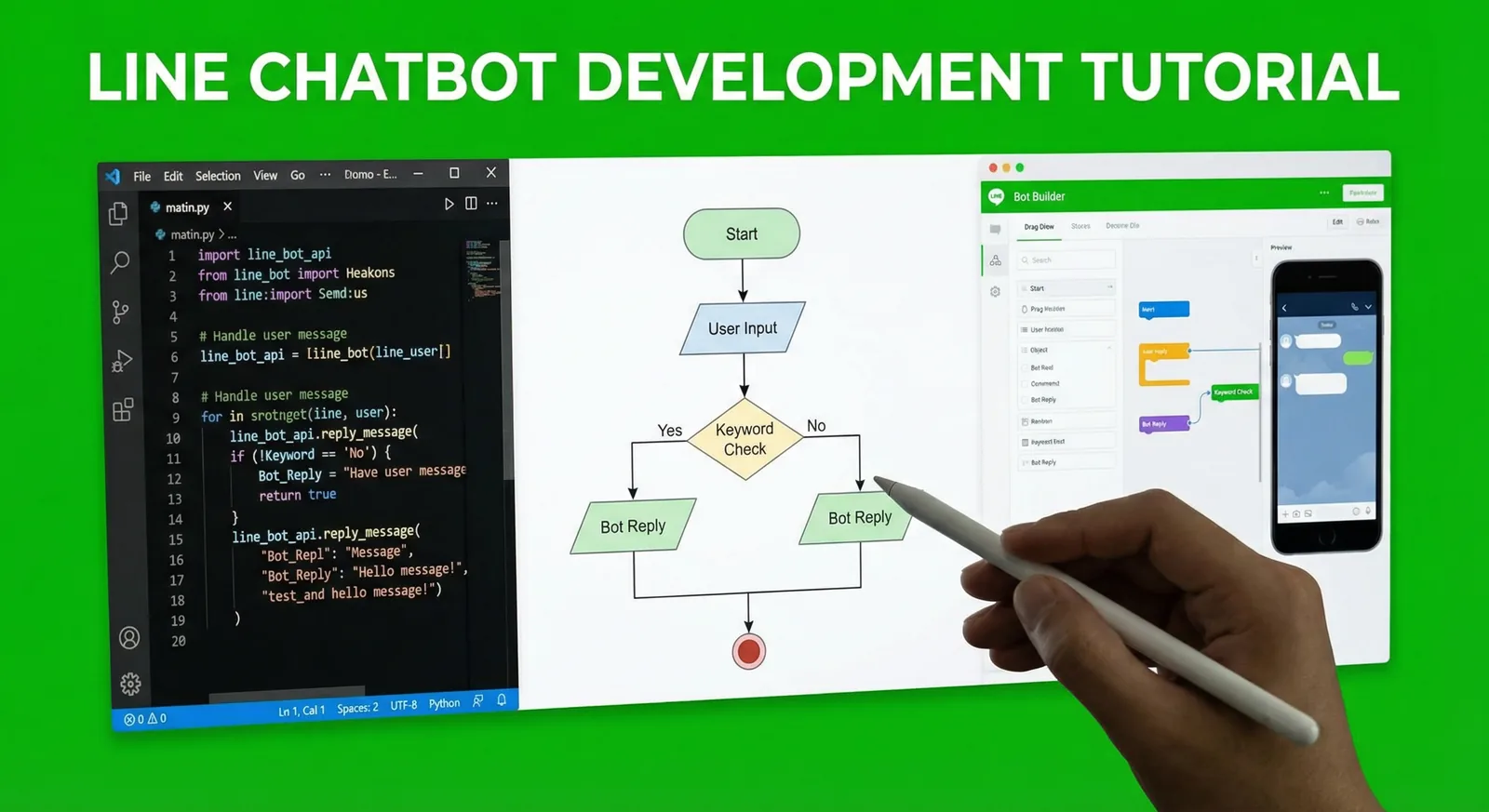
LINE Chatbot Development Tutorial 2026: Node.js & Python
Build a LINE bot step by step with the Messaging API: enable the channel, verify webhook signatures, reply with Flex Messages and quick replies, run a booking flow with postbacks, add AI answers limited to your FAQ and deploy. Node.js (@line/bot-sdk v11) and Python (line-bot-sdk v3) code.
Read MoreReady to Automate Your LINE Business?
Start automating your LINE communications with LineBot.pro today.